The Kellycaster is bespoke guitar that combines innovative hardware and software environments. The original Kellycaster (Mark 1) instrument was developed by John Kelly and Charles Matthews with the support of Drake Music in London, adhering to an inclusive, disability-led design methodology.
This document (project lead: Re/Lab’s Stefan Powell, with musician John Kelly and Re/Lab director Jason Nolan) contains our findings inspecting the Mk1 code and hardware at the RE/Lab with the aim to:
1) create a functioning replica of the Kellycaster Mk1, and to better understand its workings to create a next generation of Kellycaster (Mark 2).
2) develop derivatives of this type of assistive guitar/stringed instrument ecology for other disabled and non-disabled musicians, based on their own unique requirements and artistic goals.
Check out a performance by John Kelly using the Kellycaster
Background: Kellycaster Mark 1
In 2015, musician John Kelly began a collaboration with members of Drake Music in London to create a bespoke guitar based on John’s unique requirements and artistic interests. The initial Kellycaster guitar prototype was born during a DMLab hackathon at the Southbank Centre, where John collaborated with Gawain Hewitt (then head of R&D at Drake Music) and Charles Matthews to develop a hardware interface and software system that allows guitar playing with chord selection via a MIDI control interface.
The original Kellycaster project received small but significant funding from the Calouste Gulbenkian Foundation and Ulster University, Walled City Music. Gawain Hewitt supported John and Charles to manage John’s project through the initial development stage. A custom-designed maple-wood body was crafted by luthier, Jon Dickinson.
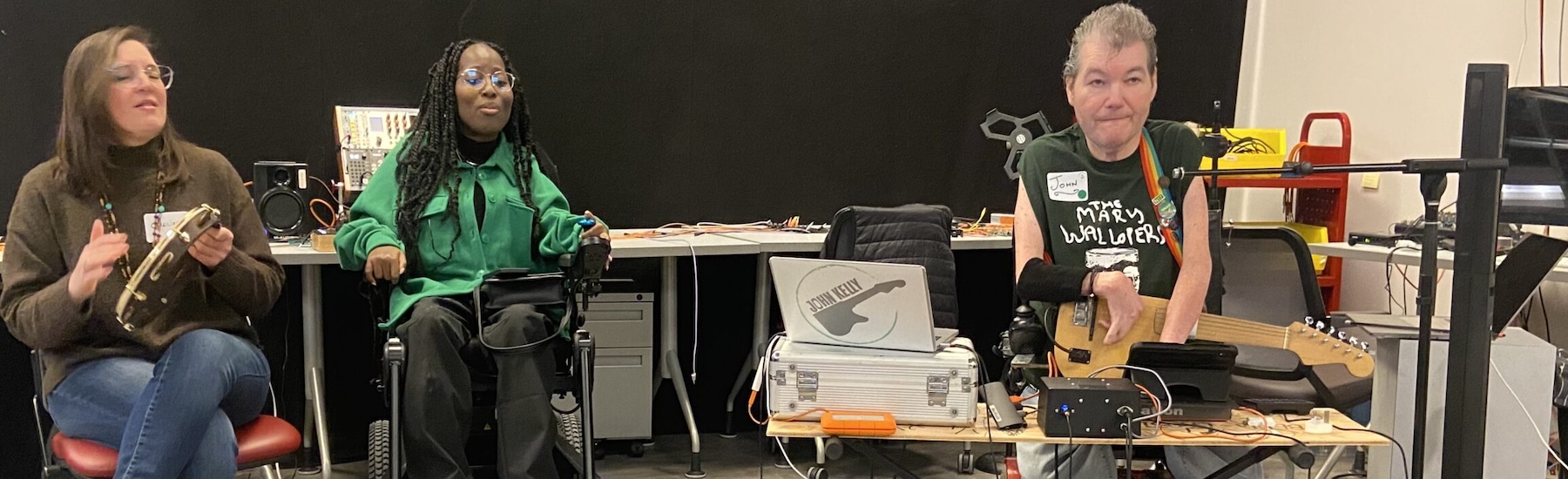
Our work with John Kelly started in 2024, when John Kelly came to Toronto as part of the Canadian Accessible Music Instruments Network (CAMIN) and Designing Sound Futures 3-Day Music Meet Up at the RE/Lab.
Since the creation of the Kellycaster Mk1, John Kelly has been recording and touring extensively using the instrument, and John has emerged as a leading public advocate for disabled musicians. However, touring and recording using a one-of-kind prototype instrument means that if the guitar is damaged or stolen, John would be left without a guitar. Further, there was no external documentation of the complex Kellycaster software environments.
Toward an Open-Access Digital Luthiery Kit
This document marks a key transition point as we develop the Kellycaster Mk2 and other open-source applications and models for use by the disability community for bespoke instrument designs and adaptations. Over the past two years, our goals have included:
- Document Legacy Code and Refactor the Mk1 system to create a duplicate (back-up) instrument for John.
- Understand how it works toward developing a next-gen version (the Kellycaster Mark 2) with extended applications and opportunities for custom interface design. The Kellycaster Mark 2 addresses limitations and use a unique software core.
Kellycaster Mk1 Documentation (Stefan Powell with John Kelly)
How it works…
The Kellycaster Mk1 consists of three parts that were all developed together and are very tightly integrated. The three parts are the bespoke guitar, the Bela box physical interface, and the Kellycaster Max4Live plug-in that creates the software interface of the Mk1 in Ableton Live, a digital audio workstation (DAW). The plug-in and DAW are controlled using a MIDI controller, and the output of the DAW goes through an audio interface.

The guitar has a divided (hexaphonic) pickup that provides a separate audio signal for each string. Those six audio signals are fed from the guitar into an external Bela box. The Bela box contains a Bela (a small form factor computer well suited for embedded real-time audio projects) with a multichannel expander that receives the six audio signals from the divided pickup. The Bela box also has a small power supply that feeds the guitar pickup over the 13-pin DIN cable.
Above is a video created by John that ‘shows’ the Kellycaster ecology documented below.
The external Bela box runs a compiled Pure Data patch that receives the six audio inputs and performs fast onset/velocity detection and envelope tracking to create note triggers with note velocity, and sends those values using OSC (Open Sound Control) to the Kellycaster Max4Live plug-in. The plug-in receives those note and velocity values, and applies the string transpositions for the selected chord based on guitar tabs stored in data files used by the plug-in.
The tuning of the guitar strings is not critical to the sound output of the Kellycaster, because no frequency information is used from the strings. It is the pluck/strum attack (onset) detection of each individual string that is turned into MIDI data by Kellycaster system, that then feeds into string synthesis/sampler instrument plug-ins in Ableton Live to create very low latency, realistic, and expressive guitar sounds. While precise tuning is not required, the string tension needs to occasionally be adjusted (like tuning) to ensure the string tension gives the correct signal response (string velocity and note signal on/off) and playability response when John strums the strings.
Each string on the guitar is fixed to a particular MIDI value. From string 6 (low-E) to string 1 (high-E), the open string MIDI values are 40 (Elow), 45 (A), 50 (D), 55 (G), 49 (B), 64 (Ehigh). These MIDI values are then transposed to the desired value based on the selected chord in the Kellycaster plug-in.
To illustrate how the transposition works, we can use an example.
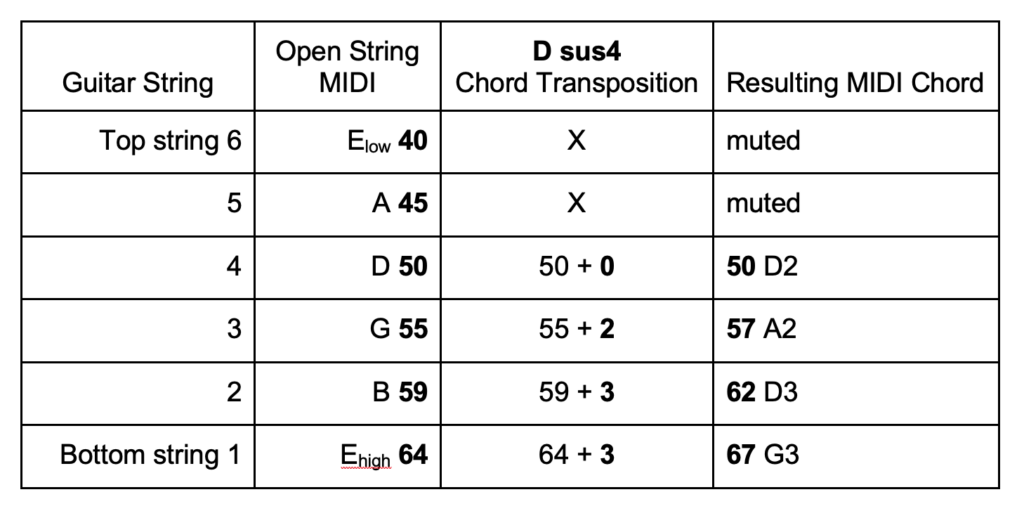
The chord D sus4 is defined inside John’s chord book JSON data file as D:{“sus4” : [ 3, 3, 2, 0, “x”, “x” ]}. (Note: the order in the Kellycaster data file is from high-E to low-E (string 1 to string 6), but common guitar tabs would express chords from low-E to high-E as xx0233. This flip was unintentional and can cause confusion when editing the data file. This will be improved upon in future versions.
The “x” in this case designates that that string should be muted, and even if that string is plucked, no MIDI data will flow for that string. The numbers represent the finger position on a fretboard with 0 being an open string, 1 would be finger on first fret, 2 is finger on second fret, etc. The Kellycaster plug-in, adds each of these finger position values to the open string MIDI values transposing the notes to the correct chord. Strumming the strings with this chord selected results in a chord consisting of MIDI values 50, 57, 62, 67 (D2, A2, D3, G3).
Once “a song” is mapped out on the Kellycaster plug-in, John saves this to a JSON songbook file and will then map control of the the plug-in through MIDI signal to a physical interface (currently a Novation Launchkey Mini and then any guitar effects are controlled via an Elgato Stream Deck or other MIDI trigger device).
Essentially there are two JSON files driving to the Kellycaster plug-in. One with chord tabs and the other JSON file contains collections of chord progressions for each song. John can change and create these bespoke chords and songs pretty much immediately.
This is a general summary of how the Kellycaster Mk1 works. We can now dive in deeper and trace how everything operates at a more detailed level to see the parts, layers, and pathways that make the Mk1 work.
The Kellycaster Mk1 Guitar
The custom shape of John’s guitar body is the result of a design process exploring what size and form would work well for John. Since the Kellycaster does not use pitch information from the strings, this means that a custom neck without frets or a truss rod could be used. The strings still do need the correct tension which is adjusted during set up. John’s guitar has a metal cover that goes over the string at the position of his left arm that allows the open strings to ring without his arm hitting them. It is positioned so John can roll his left arm, hard or softly to dampen or stop the strings.
The Kellycaster Mk1 is fitted with a Roland GK3 pickup (using Roland GK-KIT-GT3), which consists of a divided six-string (hexaphonic) pickup that captures and communicates signals for each string individually, and a small preamp board installed into the guitar. The pickup is connected to the external Bela box by a 13-pin DIN cable, sending the six audio signals, and receiving ±7 volts to power the pickup preamp board. It should be noted that the 13-pin DIN cable is somewhat fragile and prone to connection problems, so it is not ideal for future designs.
The initial design document created by John envisioned a much more self-contained instrument than the Kellycaster Mk1 (addressed in our MK2 version). The various early guitar body designs by John were shaped to accommodate a place for a set of chord-changing keys. For many years John had previously learned and played a variety of keyboards so his natural playing style was already developed around using MIDI keyboards. Since the chord control interface resided in the Kellycaster plug-in it made sense to place those chord change controls in the plug-in user interface, with ways to control the plug-in using a MIDI keyboard. (Novation Launchkey Mini). The MIDI keyboard controllers are affordable, robust and reliable for performance, and this setup worked well for John during testing. Also, John often reassigns MIDI control keys to different functions inside Ableton Live depending on his performance/artistic requirements.
The Kellycaster Mk1 Bela Box
The Mk1 relies on an external box that acts as a hardware interface between the GK-3 divided pickup and the computer running the Kellycaster Max4Live plug-in. This Bela box contains a Bela computer fitted with a multichannel “Audio Expander Capelet” that receives the six audio signals from the 13-pin DIN connector, and a small power supply that provides ±7 volts to power the GK-3 preamp over the DIN cable.
The wiring of the GK connector, GK power supply, and Bela Audio Expander Capelet are illustrated in the following diagram.
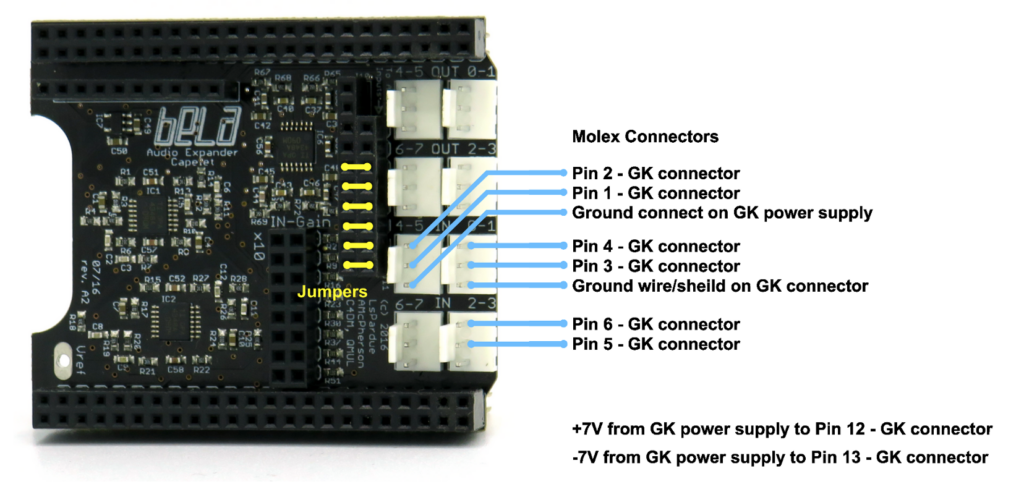
The order of the strings is not logically mapped to the inputs on the audio expander, so to keep full Kellycaster Mk1 compatibility, the order of the wires needs to be done exactly as shown, and the string order is then corrected inside the Pure Data patch that is run on the Bela.
The Kellycaster Mk1 Bela code consists of a Pure Data patch with some custom abstractions, and a custom render.cpp file to facilitate communication between the Pure Data patch and the Max4Live plug-in over Open Sound Control (OSC). To understand these parts, we need to explain a little bit about the Bela environment, and how these software components fit together.
The Bela does not run a full version of Pure Data, rather it compiles Pure Data patches that are loaded on its memory card. This compiled Pd code is called through a renderer that binds it to libpd and the hardware abstractions of the Bela. In the case of the Mk1 code, a custom render.cpp file is used in order to pass data assigned Pure Data symbols over to Max4Live as OSC messages, and to receive settings instructions from Max4Live over OSC. The OSC protocol communicates over a virtual network connection created between the Bela (which acts like a USB network device) and the host computer.
When working on creating a Mk1 clone from a copy of John’s Bela software, we ran into compilation errors due to a deprecation of the Open Sound Control libraries (OSCServer.h and OSCClient.h) used in the old version of the Bela environment on which the Mk1 was built. At the Re/lab, Stefan created a modified version of the render.cpp file that updates the OSC communication hooks to use updated libraries (OscSender.h and OscReceiver.h) supported in the current Bela environment. (0.3.8h at the time of writing this) This change in code is transparent to the Mk1 system and is fully compatible with it.
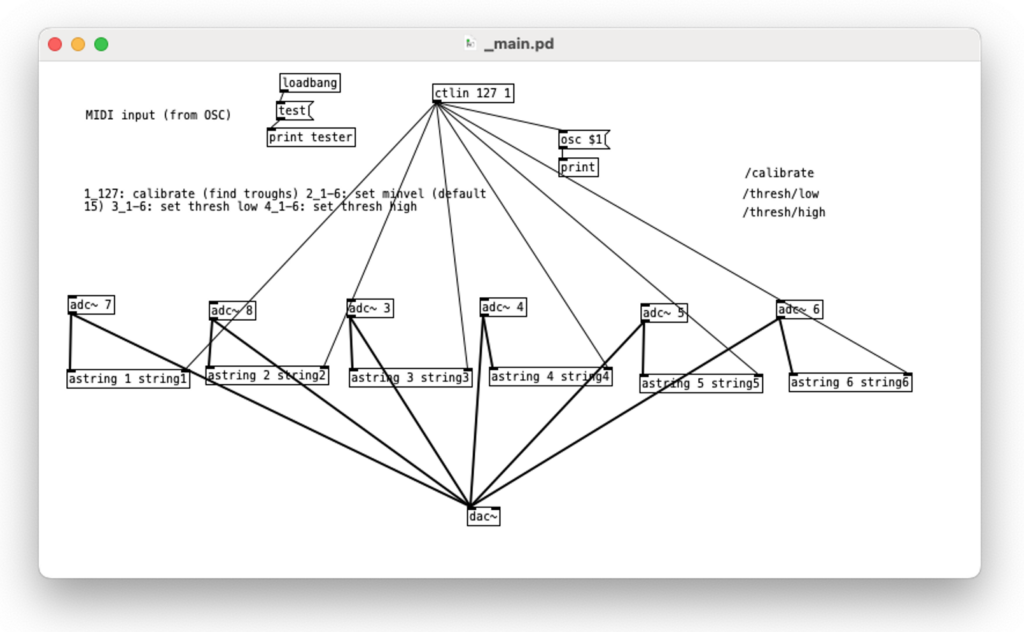
Below is the main Mk1 Pure Data patch where the Analog to Digital Convertors (ADCs) of each string input are mapped to the logical strings inside the Mk1 code. These are tied to six copies of an abstraction called “astring”. The [ctlin 127 1] object at the top of the patch is how the patch receives calibration settings that are passed to all the string objects.
In the next image, below, is the “astring” Pure Data abstraction. Each copy is also receiving threshold setting values for the bonk~ object. The bonk~ object performs extremely low latency onset detection on the audio signal it receives from the left most inlet~. Rising changes over a minimum threshold trigger this abstraction to send a “velocity” value to the assigned string symbol. (“string1”, “string2”, etc.) The envelope follower (env~) tracks the amplitude of the string audio signal, and using a “trough” abstraction, triggers sending zero (equivalent of a note-off event) to the assigned symbol. The values sent to symbols are processed by the custom render.cpp file and turned into OSC messages that are sent to the Max4Live plug-in.
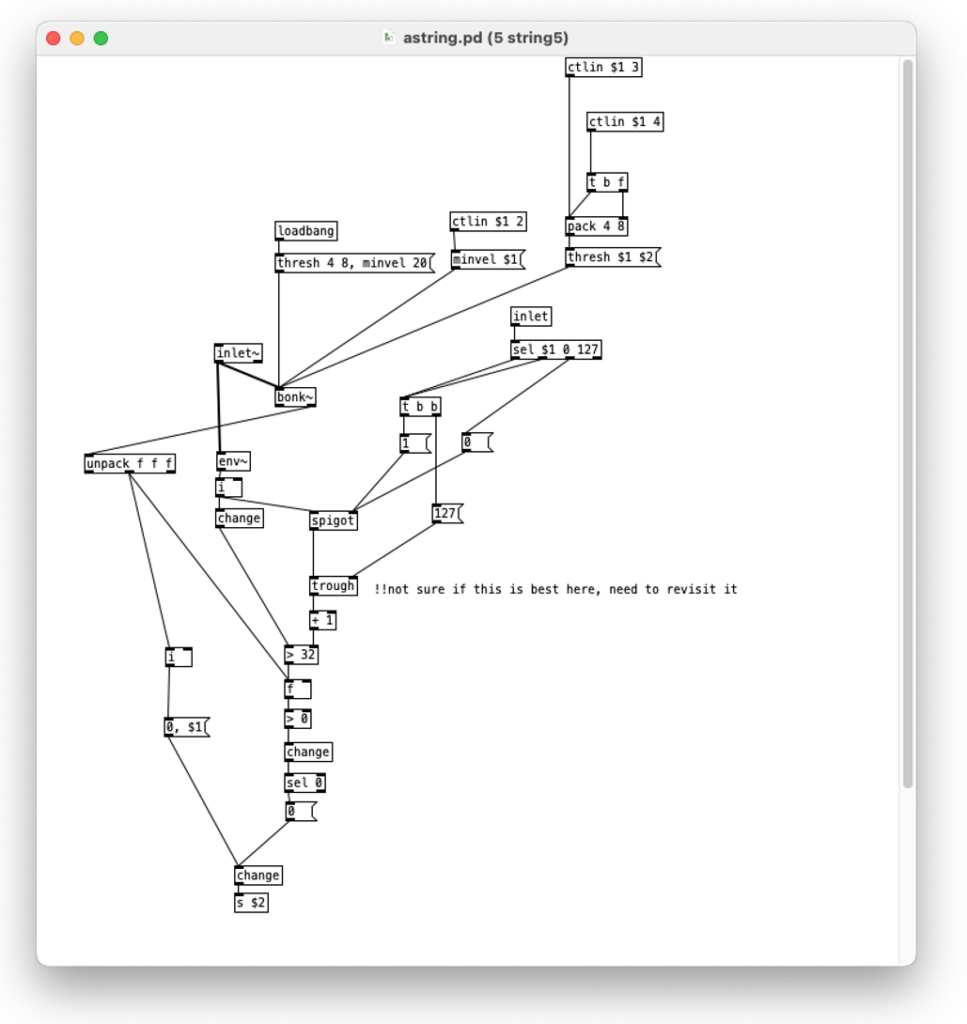
This image (below) illustrates the “trough” Pure Data abstraction used to detect the bottom of the decay of the string signal.
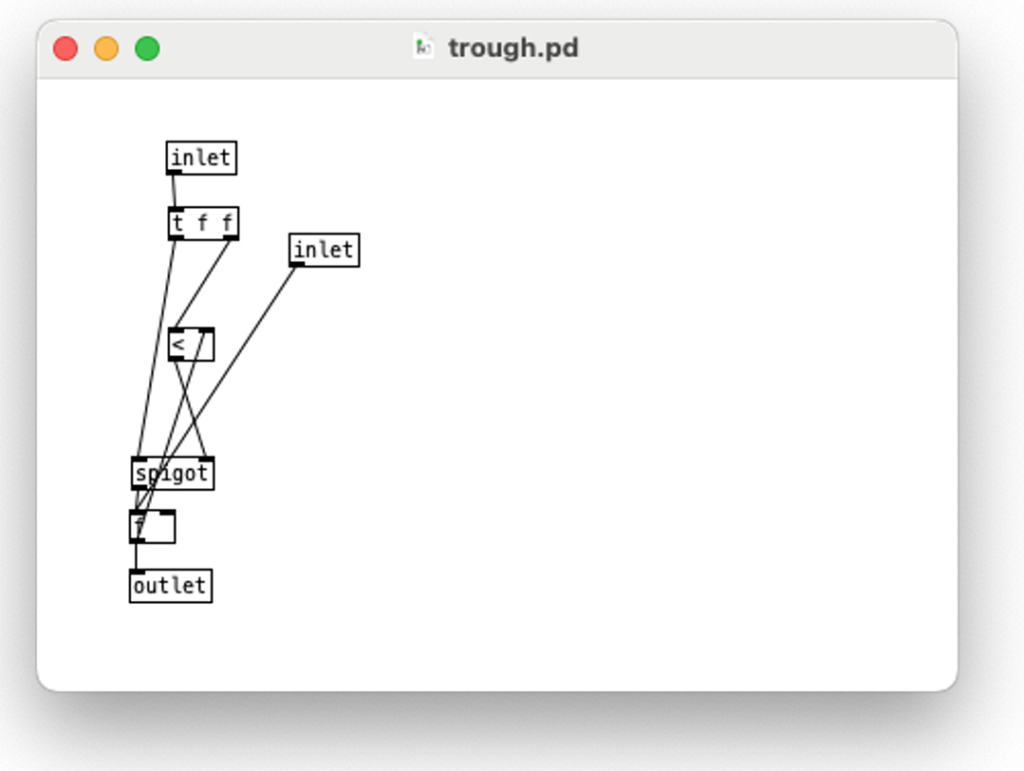
Part of the core innovation of the Kellycaster is the use of bonk~ and dispensing with any form of signal analysis to extract frequency information, since the open strings are fixed to their MIDI values. The latency of this approach is extremely low. In this design, there was a missed opportunity to use the “brightness” value that is also calculated by bonk~. This value could be used as an additional expressive parameter to account for pluck characteristics (e.g., a brighter measure could sound more like using a pick, and softer or more muted measure may sound more like using fingertips on strings).
The Kellycaster Mk1 Plug-In

Ableton Live with Kellycaster Max4Live Plug-In

The Kellycaster Max4Live plug-in is both the user interface of the Kellycaster Mk1 and it is the engine that handles the chord changes. The plug-in receives OSC messages sent by the Bela render.cpp code over the Bela USB network connection. The OSC messages for each string represent the note velocity for each string and are tied to each corresponding string number. Based on whatever the currently selected chord may be, the respective fret position values are added to the fixed MIDI values of open strings and velocity (or muting) applied and turned into MIDI note-on events that are emitted by the Max4Live plug-in.
The plug-in uses information contained in a chords.json file to map chord names to values analogous to guitar tabs that represent finger positions on the fretboard. For John to play a chord, it needs to be predefined in this file. When composing, John will have to close Ableton and open the chords.json file in a text editor to add the new chords, and this has to be done carefully, because the order of the values is in the opposite order of a standard guitar tab, so it can be tricky editing this file (Guitar tabs are ordered from string 6 to string 1, but the chords.json file has them ordered from string 1 to 6). Once saved, Ableton and the Kellycaster plug-in can be opened to read the new file. But these various steps slow down the artistic process of experimenting with chord shapes and sounds. Future development work will aim for a more intuitive and responsive chord modification/composition process.
Not all of the chords defined in the chords.json file are available all at once in the plug-in, rather a palette of up to 10 chords is loaded into the plug-in as defined in a songbook.json file (as a workaround to the limit of the 10 chord palette, John used a MIDI shortcut to switch to “next song” to load a different palette.). Similar to editing chords during the composition process, this songbook.json file needs to be opened and edited to define the set of chords that are used in a song. The Kellycaster plug-in reads the songbook file and presents a dropdown of the defined songs. John will order these into the set for each show. Selecting one of these songs loads those chords into the chord slots in the plug-in. The MIDI keyboard controller can also be used to cycle up and down the list of defined songs. Once song chords are loaded into the chord slots, the MIDI keyboard controller can be used to select a chord, and the chord transposition is applied to the incoming stream of string data.
The emitted MIDI data is used by software string synthesis inside Ableton Live to create realistic guitar sound. John uses a couple different software instruments inside Ableton Live; Guitar Rig 6 for electric guitar (often as multiple pedals), and for his acoustic guitar sound he uses a hybrid sampling and physical modelling plug-in called Evolution Steel String as well as Flatpkick 6, a sample-based guitar. Using MIDI mapping in Ableton, John can switch between acoustic and electric guitar while playing, as well as toggle effects in the software effects chain. Occasionally, John also uses an additional MIDI controller linked to the effects parameters. Each of these plug-ins have their own screen navigated by each MIDI-mapped Ableton track.
Technique/Style Add-ons
There are additional controls in the Kellycaster Max4Live plug-in, some of which were added as part of the development and testing of the Mk1. Add-ons are based on John’s requests for features to assist with different ways of simulating various styles and techniques of playing/guitar interaction.
There is more than one way to do the same or similar functions in the Kellycaster plug-in to support changing accessibility requirements.
This flexibility accommodates John’s workflow, and he is able to change key mappings to set performance variables up for different situations, and for playing live. I document these variables below:
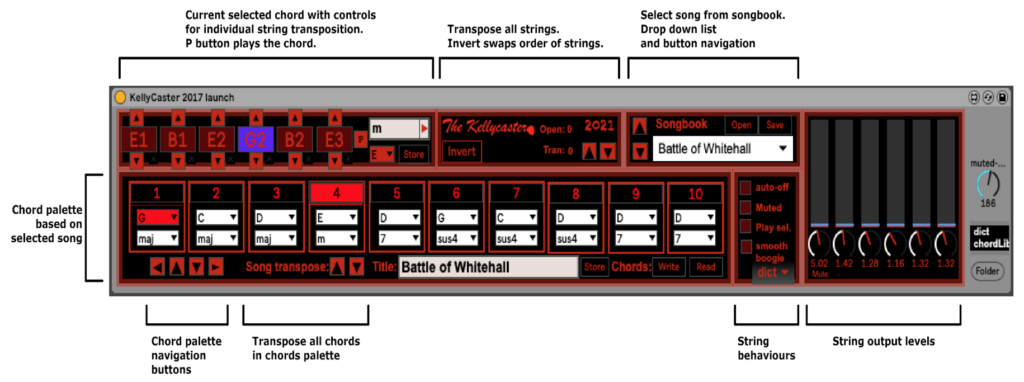
The Play sel. Toggle:
When activated, the Play sel. toggle causes the plug-in to play a strum of the selected chord directly without a keyboard/interface. This is useful in the setup and testing in the Kellycaster plug-in and must be turned off to play the Kellycaster, or it will play the chord with the button and again with the strings.
Volume boost per string:
John can adjust volume boost settings while setting up and, depending on if the environment is cold or John’s access needs vary, he can boost each string depending on his physical strength in that particular situation.
The Invert button
Swaps the order of the strings such that triggering the strings, low to high, would process them as though you played high to low. John uses this to be able to play certain songs/styles where lower strings need to be more prominent. This is also useful when using a guitar where the divided pickup is reversed.
The Auto-off toggle
When activated, Auto-off toggle will cause the plug-in to mute all the strings each time a chord is changed to ensure a clean chord transition and that no ringing of the previous chord blends into the next.
The Muted toggle
This toggle will cause the played notes to play without sustain. The length of the notes is controlled by a dial on the right side of the plug-in interface, and can also be controlled using a knob on a MIDI controller.
Transpose strings and Transpose songs
Transpose strings works like a capo and will shift all strings up or down a set number of MIDI values (semitones) without altering the chord shapes being displayed in the chord palette. This allows quick adjustment of a song to be in tune with other musicians without altering chord names. Song Transpose essentially does the same semitone transposition, but the chord names in the chord palette update to the transposed chord.
The ‘Smooth Boogie’ toggle
This is used by John when playing music like a 12 bar boogie, or the blues (which John calls the Smooth Boogie function). When toggled on, the root chord remains open and rings across different chord changes, and notes that change to “X” (mute) will also continue to mute.
String output levels are used to boost or attenuate the output signal of each string. It also provides a visual meter of each string to see the level coming in from the guitar. John uses this to adjust levels to even out how the chords sound. These are adjusted depending on the playing conditions.
Note that the ‘Store’ and ‘Write’ buttons in the Kellycaster plug-in are for writing changes to the JSON data files, but these do not function properly and so are not used fully. Instead, the JSON files are edited manually in a text editor.
Complexity of the Kellycaster Mk1 Max4Live Patch
Much of the functionality of the Kellycaster Mk1 resides in the capabilities of the Max4Live patch. In documenting the Kellycaster Mk1 project, the complexity of the Kellycaster Max4Live patch has remained somewhat opaque. This is partially due to the nature of patch-based languages like Max4Live, especially when creating graphic user interfaces, but also in the way the project is presently implemented in Max4Live.
If someone has in-depth experience programming user interfaces, list manipulation, and complex message passing in Max4Live, as well as extending Max4Live through Javascript code, then they may be able to fully understand how everything works.
In the case of this documentation project, we limited the scope to describing the functionality, without delving into the complex workings of the Max4Live patch. The current Max4Live code is limited in its maintainability, and we are completely rebuilding the Kellycaster functionality in a different way to make the code easier to understand, maintain, and extend, as well as to make the next version of the Kellycaster compatible with other DAWs.
Future Kellycaster Development
Taking lessons learned from documenting the Kellycaster Mk1, we are working with John on developing further iterations of the instrument, with the goals of addressing issues of robustness to make the instrument better stand up to the working life of a professional, touring musician, and to decouple the dependency on Max4Live such that the instrument can be adapted for other musicians who work in different audio workstation environments, and who have different needs to be met. This path aims to create an adaptable toolkit for building variations of the Kellycaster and extending it for various needs. Also, the initial design document created by John in 2015 envisioned a much more self-contained instrument than the Kellycaster Mk1.
Update (July 2026): Here is a glimpse into our progress on the Kellycaster Mk2, led by Stefan Powell working at the TMU RE/Lab.